Download Available Now

Cull the burst, keep the moment.

Professional-grade culling for the burst era. Private, native, and blazing fast on Apple Silicon.

Native Mac app · No cloud required

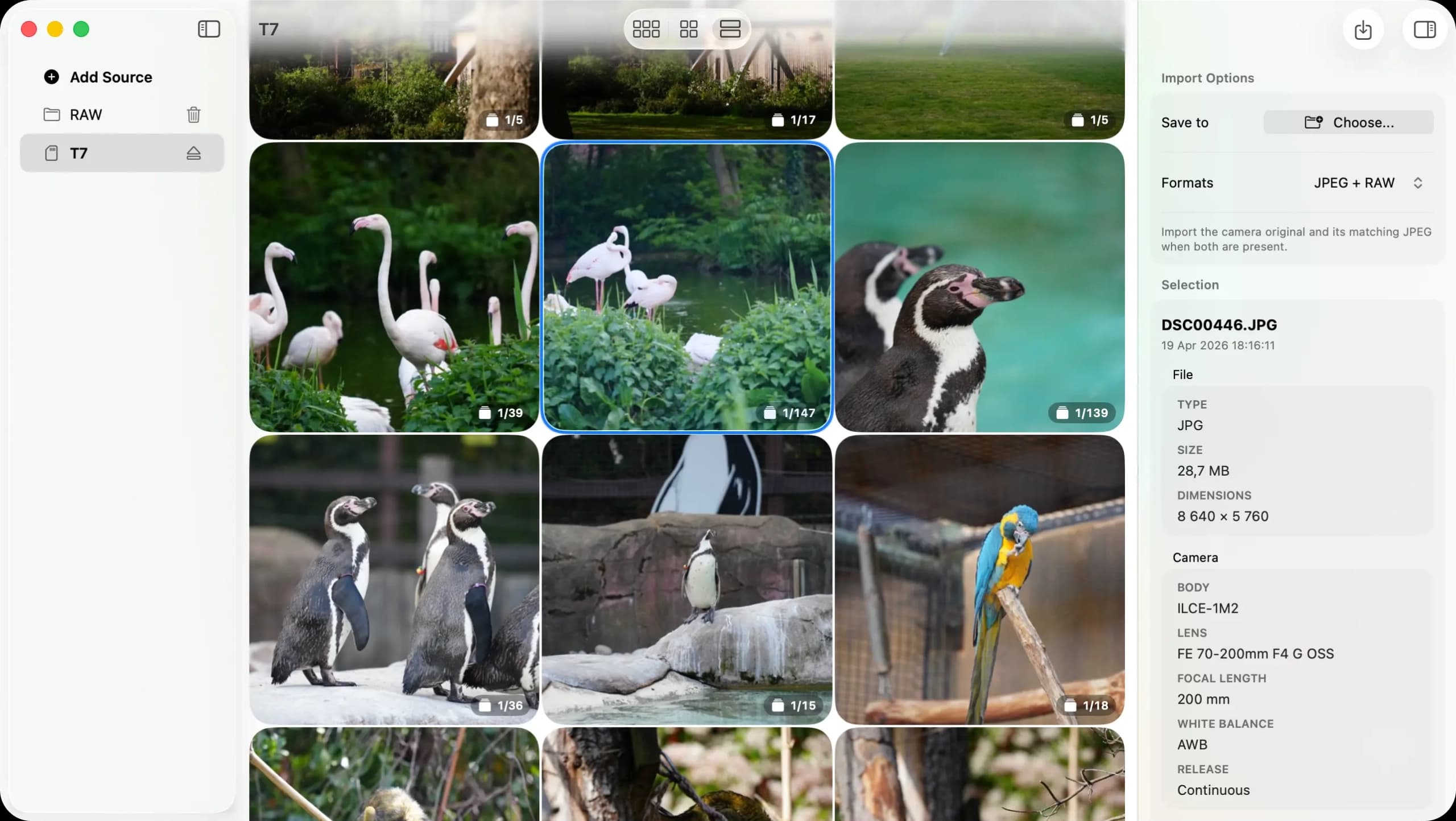
Kepper showing burst groups and import options

Built for the high-FPS era.

Modern cameras shoot thousands of frames. Why are you still culling them one by one?

Burst-aware culling

Group high-FPS sequences so you review the moment, not every near-duplicate frame one by one.

Fast at any scale

Responsive browsing and previewing, even across 10,000+ frame shoots from long days or full cards.

Local-first Mac app

Your photo workflow stays on your Mac, with focused controls and privacy-conscious analytics.

Blazing fast on Apple Silicon.

Built natively with Swift and Metal. Kepper leverages the Neural Engine to detect sharpest frames in a burst sequence instantly.

  • Hardware-accelerated RAW decoding
  • Native M-series chip optimization
  • Metal-powered previews

Your photos, your Mac.

We believe your creative work is private. Kepper is local-first by default. You can optionally opt-in to share anonymized samples to help train our culling AI, helping the entire community get better results.

Frequently Asked Questions

Is Kepper optimized for Apple Silicon?

Absolutely. Kepper is a native macOS application built with Swift and Metal, fully optimized for Apple M-series chips.

Which file formats are supported?

We support RAW files from all major camera manufacturers (Sony, Canon, Nikon, Fuji) as well as JPEG and HEIC pairs.

Where are my photos stored?

Kepper is local-first. Your photos stay on your Mac by default. You can optionally opt-in to share specific frames to help improve our AI models, but this is always under your control.

How much will Kepper cost?

Kepper is currently free to use while we grow. We plan to offer a simple one-time purchase model for the full version.

Ready for a faster photo workflow?

Download Kepper today and start culling your high-FPS shoots in minutes.